Dust in an air conditioner reduces cooling efficiency, increases noise, increases energy consumption, and can degrade indoor air quality. Regular cleaning helps maintain stable operation and reduces the risk of unpleasant odors.
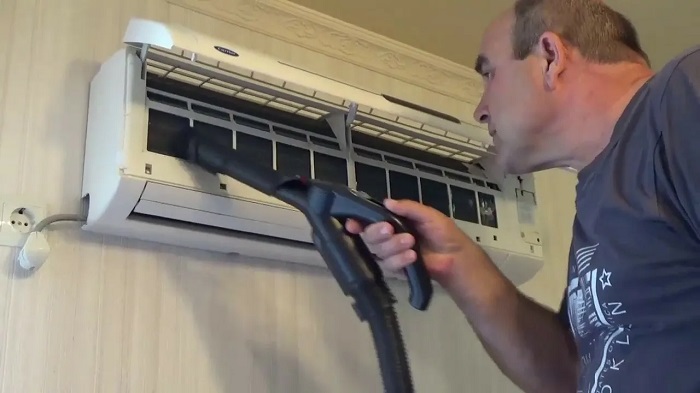
Most basic cleaning procedures can be performed independently: clean the filters, wash the louvers, remove scale from the housing, and carefully remove surface dust from the heat exchanger. If you notice a persistent odor, leaks, frost, or a lack of cooling, it’s best to call a professional from local air conditioner repair company.
Preparation and Safety Precautions
- Turn off the power to the air conditioner at the control panel or unplug it from the outlet to prevent the fan from starting during operation.
- Protect the wall and floor: lay a sheet or cloth under the indoor unit, and have wipes available to catch drips.
- Use appropriate cleaning products: a soft brush, a vacuum cleaner with a brush attachment, warm water, a neutral cleaning solution, or an HVAC antiseptic spray (as per instructions).
- Avoid high pressure: do not direct a strong stream of water at electronics or the motor.
Helpful Prevention Tips
- Frequency: Filters – every 2–4 weeks During the season, a deeper cleaning is recommended 1-2 times a year.
- The right mode: periodically turn on the ventilation/dehumidification mode to reduce humidity inside the unit.
- Room cleanliness: regular cleaning and a minimum of dust (carpets, open shelves) significantly reduce air conditioner contamination.
- After service: let the air conditioner run for 10-15 minutes on ventilation to dry the internal components.
- When diagnostics are needed: slight cold, icing, leaks, unusual noise, or a burning smell are signs that cleaning alone is not enough.
How to tell if a split system needs cleaning: odor, weak airflow, noise, errors
You can tell that your air conditioner needs cleaning by changes in odor, air flow, sounds, and mode operation. These symptoms are most often associated with dust accumulation on filters and heat exchangers, clogged drains, and fans.
The sooner you respond to symptoms, the easier and cheaper it is to restore normal operation: the risk of leaks, freezing, overheating, and premature wear of components decreases. If symptoms recur after a basic filter cleaning, it’s worth scheduling a deeper cleaning or service.
Main symptoms and what they mean
- An unpleasant odor (musty, damp, moldy) when turned on: possible dirt on the evaporator, fan, or drain system; often accompanied by increased humidity and plaque.
- Weak airflow with previous settings: likely clogged filters or heat exchanger, dirty fan; The air conditioner begins to cool/heat less efficiently and runs longer.
- Unusual noise (humming, crackling, whistling, vibration): dust on the impeller disrupts the balance, the fasteners may have loosened, or debris may be interfering; increased noise often coincides with decreased efficiency.
- Error codes on the display/flashing indicators: codes vary between models, but often the cause is indirectly related to contamination (overheating, icing, poor heat exchange, drainage issues). If errors persist, diagnostics are needed.
- Drips and streaks from the indoor unit: the drain may be clogged or the tray may be overflowing due to dirt and biofilm.
- Freezing of the indoor unit/pipes: contamination impairs heat exchange and airflow, which can lead to ice buildup.
Summary: If an odor appears, the airflow has decreased, noise has increased, or the air conditioner has started displaying errors, this is a direct signal for cleaning. They start with filters and checking the drainage, and if symptoms persist, they move on to a deep cleaning of the heat exchanger and fan or contact a service center to prevent leaks, freezing, and breakdowns.